An assistant answer is more than the text. It shows what it did to get there, what it based the answer on, and sometimes what it would like to do next. Knowing how to read those three things is the difference between trusting the tool and hoping it is right.
What it did to answer
While the assistant works, an Activity trace names each step. Select Show steps to expand it, or Hide steps to collapse it again. The steps you will see are:
- Searching your documents — looking through the material you attached or referenced.
- Searching the web — only when you turned Use web sources on.
- Running contract review — analysing a document rather than just reading it.
Where the answer came from
The Sources panel lists what the answer was built on. If the panel says there is no specific source, the assistant answered from general knowledge — treat that answer with more caution than one that cites your own document.
- Document
- A document from one of your workspaces. Select it to open the source.
- Web
- A page found online, available only when web sources were enabled.
- Attached file
- Something you attached to this message.
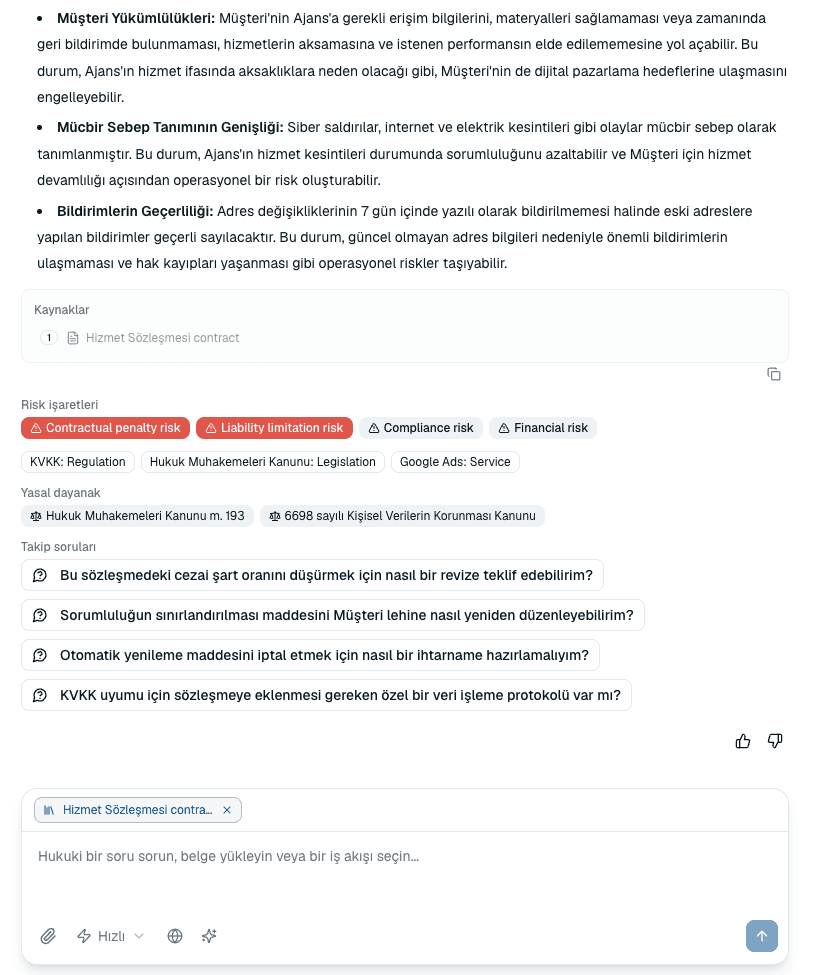
The panels beneath an answer
- Follow-up questions
- Suggested next questions. Faster than typing, and often better phrased than what you would have asked.
- Related documents
- Other documents in your workspaces that bear on the answer.
- Risk flags
- Specific risks the assistant wants to draw attention to.
- Legal basis
- The legal grounding it relied on, so you can check the reasoning rather than just the conclusion.
Staying in control
- Stop
- Halts a response mid-stream. What has already been written stays, so you can stop a long answer once you have what you needed.
- Retry
- If a response is interrupted, retry without losing the conversation.
- Helpful / Not helpful
- Rate an answer. This is how the assistant's quality gets tracked, so it is worth using when an answer is notably good or bad.
Common questions
The answer cited no sources. Is it wrong?
Not necessarily, but it was answered from general knowledge rather than your documents. For anything that matters, attach or reference the document and ask again so the answer can be checked against a source.
A source says it is no longer available.
The document it cited has been deleted or moved out of your access since the answer was written. The answer itself is unchanged, but you can no longer open that source to verify it.
About this guide
Imported from the application Help Center on 23 September 2026. The original content date is preserved. Product workflows and screenshots have not been revalidated against current account permissions and availability.