A review reads an agreement, measures it against your playbook, and flags what needs attention before you sign. It is the fastest way to get a second opinion on a contract somebody else drafted.
Before you start
- Have the file ready as
.docx,.pdfor.udf, under 10 MB. A DOCX gives the most accurate result. - Know which party you represent. This is the single setting that most changes the findings you get back.
- Decide which workspace the reviewed document should be saved in — that decides who else can see it.
Start a review
- Open Tools → Contract review in the sidebar.
- Upload the agreement, or choose one already in your workspace. Harmonity extracts the text and begins detecting the parties.
- On the Contract Review Setup screen, fill in the six fields: File Name, Review Side, Review Language, Jurisdiction, Save to, and Playbook.
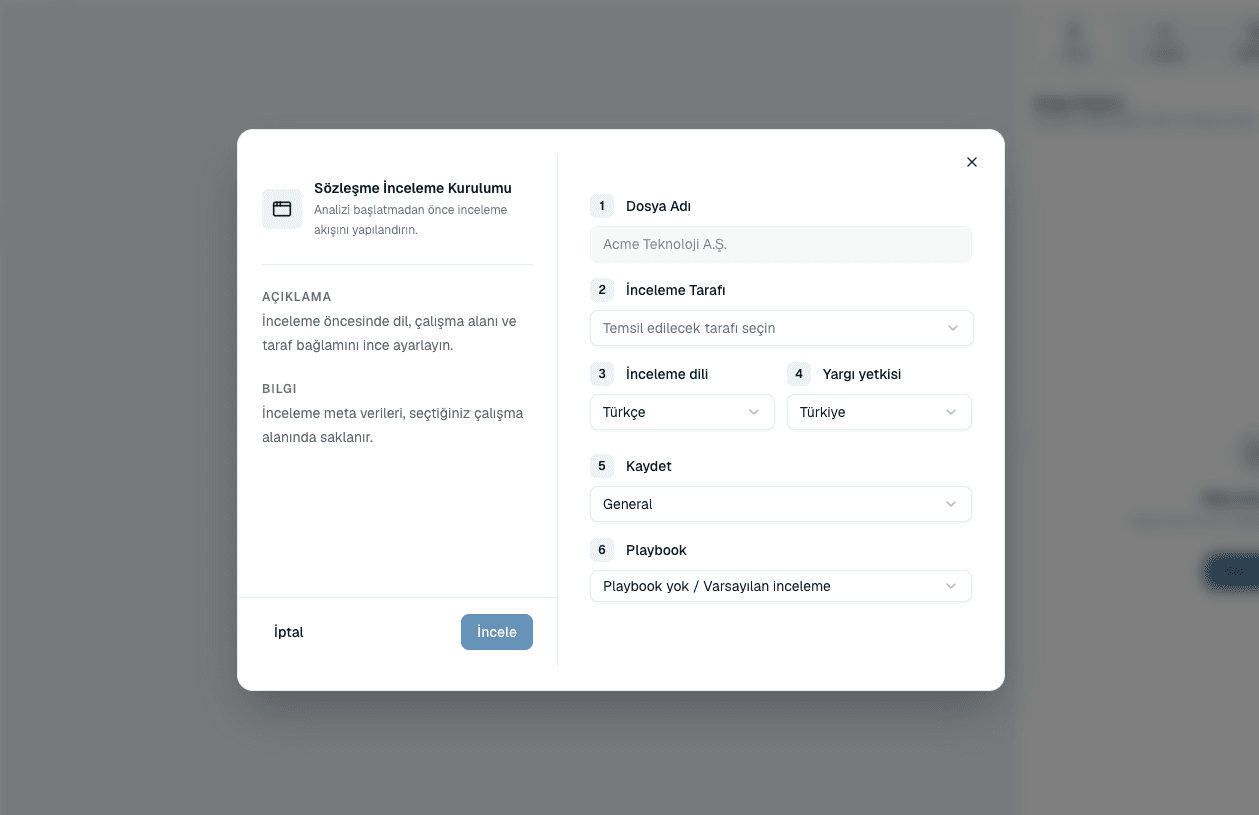 Source screenshots show the Turkish interface.
 - Select Review.
- Watch the Contract Analysis panel on the right. Findings appear there as they are produced.
Common questions
Do I need a playbook to run a review?
No. Leave Playbook on No playbook / Default review and you get a general legal review. With a playbook, findings are measured against your organization's own positions, which is considerably more useful.
Can I review a contract that is already in Harmonity?
Yes. Start from Contract review and pick an existing document instead of uploading, or open the document from Files and start from its Contract Analysis panel.
Harmonity picked the wrong parties. What do I do?
The Review Side dropdown lists every party it detected, plus Neutral perspective. Pick the correct one there. If none of them is right, the document text may not name the parties clearly enough to detect.
Is my contract used to train an AI model?
No. Your documents are processed to produce your review and are not used as training data.
About this guide
Imported from the application Help Center on 23 September 2026. The original content date is preserved. Product workflows and screenshots have not been revalidated against current account permissions and availability.