The editor is where a playbook actually gets its value. Everything on this screen is a draft until you save, so you can restructure freely and discard the lot if it goes wrong.
How the editor is laid out
- Header
- The playbook name, its rule count and who last updated it. Save changes and Discard changes live here, along with an Unsaved changes marker.
- Sections list
- On the left. Every section with its rules beneath it, and a severity marker on rules that are high or blocker severity.
- Rule editor
- On the right. The selected rule's number, title, severity and position text. It is empty until you select a rule.
Work with sections
- Select Add section at the bottom of the sections list and give it a name. Section names must be unique, ignoring case.
- Hover a section to rename it, generate rules for it, or add a rule to it.
- Use names that match how your team talks about the contract — “Payment Terms”, “Term and Termination” — rather than clause numbers, which change between drafts.
Write a rule
- Hover the section you want and select the plus button to add a rule.
- Give it a rule number and a rule title. Title it after the position, not the topic: “Liability capped at 12 months' fees” is more useful than “Liability”.
- Set the severity — Low, Medium, High or Blocker.
- Write the standard position, then add fallback positions in the order you would concede them, and any unacceptable positions you will not agree to.
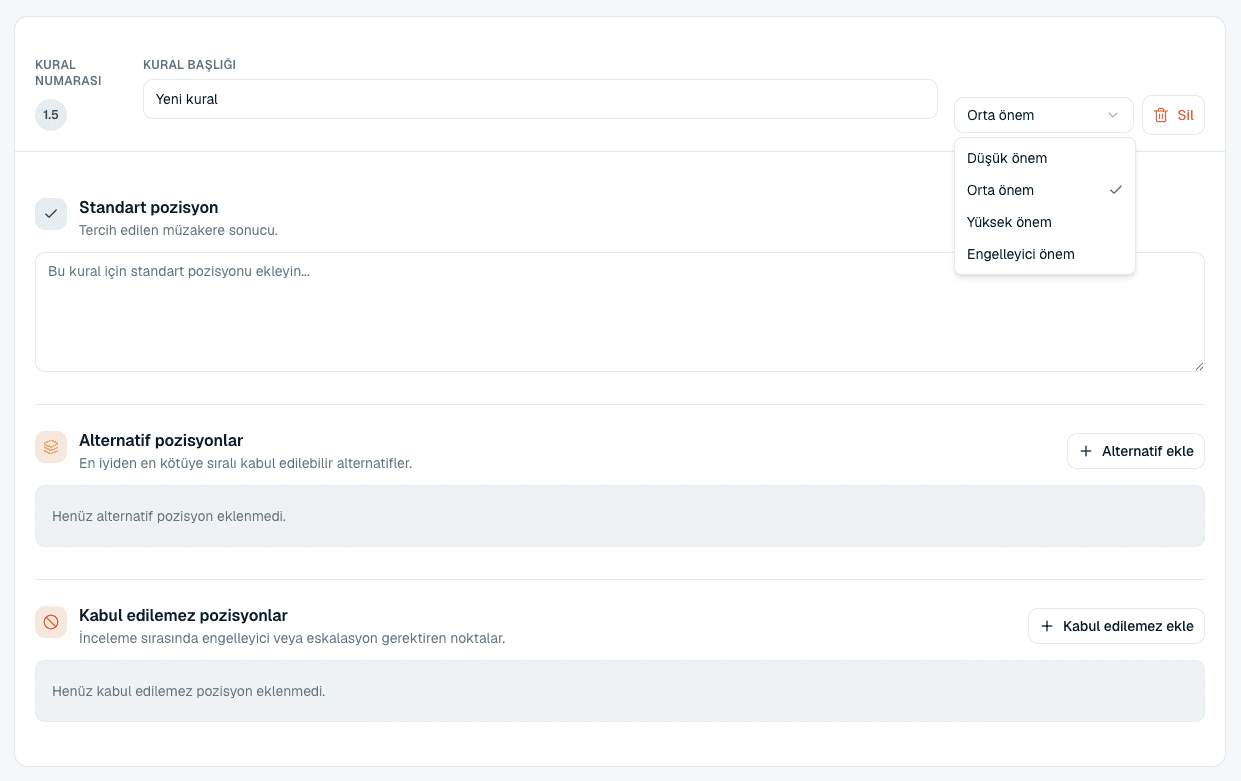 Source screenshots show the Turkish interface.
 - Select Save changes. Nothing is stored until you do.
Generate missing rules for a section
Hovering a section reveals a generate button. It asks the AI to fill in rules the section is missing, based on the playbook's contract type and what is already there. It is the fastest way to get from four rules to a usable playbook — and like any generated content, everything it adds needs reading before you trust it.
Saving, and the limits
The editor holds your whole draft in memory and validates it when you save. If a limit is exceeded, the save is refused and the message names exactly what is over and by how much.
- Rules per section
- At most 50. If a section needs more than that, it is really two sections.
- Fallback positions per rule
- At most 10.
- Unacceptable positions per rule
- At most 10.
- Section names
- Must be unique within the playbook, ignoring case.
Common questions
I left the page and lost my edits.
The editor warns you about unsaved changes before you leave, and offers to save or discard. If you confirmed leaving, the edits are gone — nothing is stored until Save changes.
How many fallback positions should a rule have?
Usually one or two, even though ten are allowed. If you find yourself writing five, the rule is probably two rules that need separating.
Can I reorder rules within a section?
Rules carry a rule number, which is what orders and identifies them. Renumber a rule to move it.
Deleting a rule asked me to confirm but said it was not permanent.
Correct — deleting removes it from the draft you are editing. It is only permanent once you select Save changes, so a deletion you regret can still be undone by discarding your changes.
About this guide
Imported from the application Help Center on 23 September 2026. The original content date is preserved. Product workflows and screenshots have not been revalidated against current account permissions and availability.